ZipStyle: Zipper Lock Screen
- 4.4
- Rating
- 100.00K
- Installs
- Free
- Price
 Analysis by App-foxy
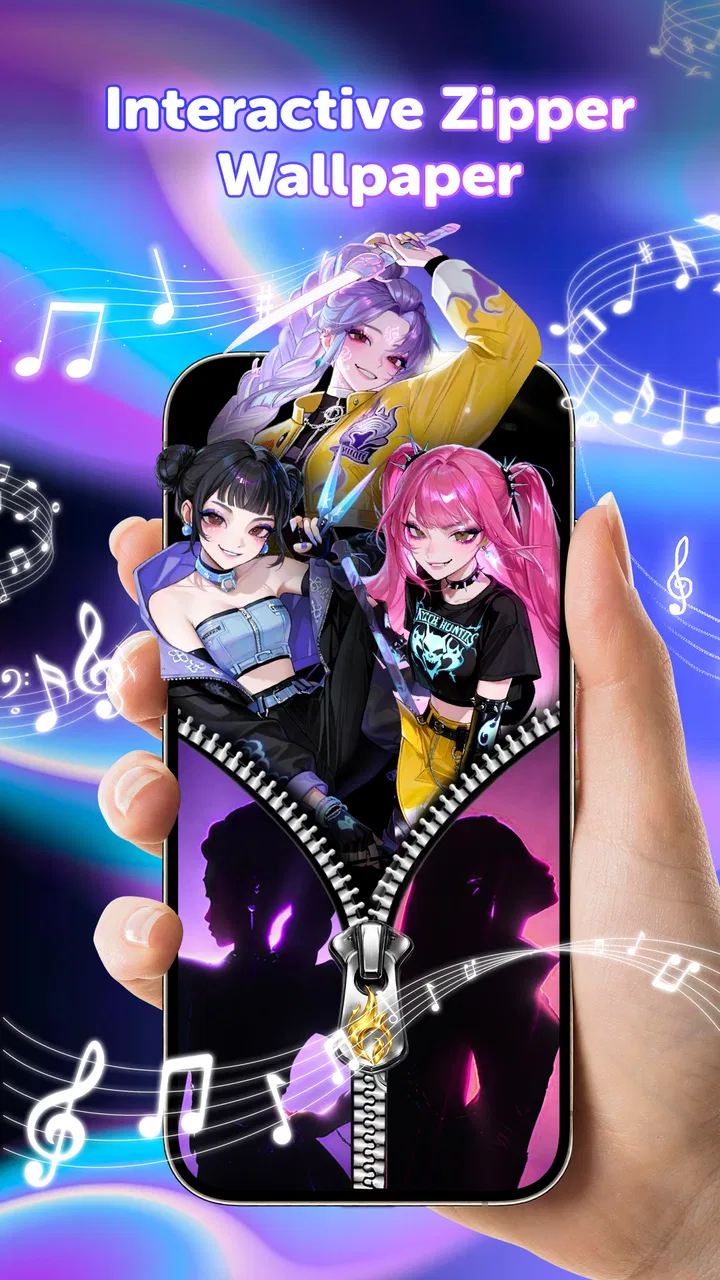
I tried ZipStyle: Zipper Lock Screen as a lightweight way to change the look of an Android lock screen, and its appeal is easy to understand: it focuses on zipper-themed wallpaper and zip-style lock-screen designs rather than trying to become a full customization suite. That narrow purpose is useful if you want a playful visual change without learning a complicated design tool.
The app belongs to the Art & Design category and is developed by BUGUN SOFTWARE COMPANY LIMITED. It is free to use, aimed at Everyone, and currently listed as version 1.2.4. The practical question is not whether it can replace a complete wallpaper editor, because it cannot be judged that way; the better question is whether a zipper effect gives your phone enough personality to justify adding another customization app.
How ZipStyle approaches lock-screen customization
The first thing I noticed is that the concept is more specific than a normal wallpaper app. Instead of presenting itself as a general collection of landscapes, abstract backgrounds, or photo tools, ZipStyle centers its identity on the visual idea of opening or closing a zipper. That makes the experience feel more like choosing a theme than simply selecting a background.
You May Also Like

 Blood Strike: 2.5 Anniversary
Blood Strike’s Loadouts Turn Every Drop Into a Tactical Gamble
A close look at Blood Strike’s custom loadouts: how fast access to signature weapons reshapes its battle royale rhythm, rewards preparation, and narrows the gap between fights.

 Pandora - Music & Podcasts
Pandora’s Music Is Easy to Start, but Harder to Recover
Pandora’s strength is its low-effort path from a seed to a station. Its weak spot is how much confidence it asks you to place in connection, setup, and quiet recovery.

 8 Ball Pool
8 Ball Pool Is Built on Rivalries, Rematches, and Routine
A close look at the rivalries, rematches, shared routines, and unanswered safety questions that turn a quick pool match into a persistent mobile community.

 Samsung Music
Samsung Music’s Quiet Strength Is Playing What You Already Own
Its reach comes less from spectacle than from dependable access to a personal library. That simplicity is both the app’s strongest retention engine and its ceiling.

 AccuWeather: Weather Radar
AccuWeather Review: A Quick, Clear Forecast for Everyday Decisions
For everyday plans, the best forecast is the one you can understand quickly. AccuWeather makes rain timing, radar, and local conditions easy to act on, with a few trade-offs.

 Hill Climb Racing
Why Hill Climb Racing Still Turns Crashes Into One More Run
A tiny car, a bumpy hill and one more upgrade: Hill Climb Racing keeps resurfacing because its simple chaos makes every near-miss feel personal.
More From Our News Desk



This focused approach can be refreshing. Many wallpaper applications make you browse through a huge collection before you find anything usable. A zipper-based app gives you a clear visual direction from the start. If you like novelty, fashion-inspired graphics, playful phone themes, or lock screens that look different from the usual static image, the concept has immediate appeal.
At the same time, the narrow theme is also the main limitation. A zipper design will not suit every mood, phone style, or situation. I would not install this expecting a broad library for every aesthetic. It is better understood as a small customization tool for people who specifically enjoy this effect.
The store summary describes cool zipper lock-screen wallpapers and zip-lock styles, and that promise sets the right expectation: the experience is about visual presentation. It is not a productivity app, a security replacement, or a general-purpose graphic editor. That distinction matters because the lock screen can look more interesting while the underlying device protection still depends on the phone’s own security settings.
What the free price means in practice
ZipStyle is free, so there is no purchase decision before trying the basic experience. That is its clearest value advantage. You can test whether the zipper look fits your phone without committing money to a theme pack or subscription. For a decorative app with a very specific style, free access makes experimentation much easier.
I also appreciate that the free price changes how I judge the app. I do not expect the breadth of a paid design package, nor do I need it to replace every customization option on Android. If the app gives me a few attractive lock-screen choices and lets me quickly decide whether the style works, it has already delivered a reasonable amount of value.
Free does not automatically mean essential, though. The app still takes time to install, browse, and configure, and a theme that looks fun in a preview may feel distracting after several days. The right way to evaluate it is to use it during normal phone routines rather than judging it only from the first visual impression.
For someone who changes wallpapers often, the absence of an upfront cost is especially useful. You can treat it as a temporary style experiment for a new phone case, a seasonal mood, or a visual refresh after months of using the same lock screen. For someone who already has a favorite personal photo or a carefully designed wallpaper, the free price may not matter because the app’s central idea may not add enough.
Where the visual value comes from
The value here comes from personality, not from a large set of practical tools. A zipper-style lock screen can make a familiar phone feel less ordinary, especially if you enjoy interfaces that imitate physical objects or clothing details. It gives the screen a small point of interaction and makes the act of checking the phone feel more distinctive.
One useful way to approach the app is to match the design to the rest of your phone. A zipper theme can work particularly well with a simple home screen, a case with a strong color, or a minimalist icon arrangement. If every part of the phone is already visually busy, the lock screen may become cluttered instead of stylish. I found that the effect works best when the surrounding setup is restrained.
Another practical consideration is readability. Decorative elements should not compete with the clock, notifications, or the gesture used to unlock the device. Before settling on a design, I would check the screen at a glance in daylight, indoors, and when notifications are present. A theme can look excellent in a clean preview but become harder to read once real alerts cover part of it.
This is one of the app’s less obvious trade-offs: the more prominent the zipper artwork is, the more attention it may draw away from information you actually need. If your lock screen is mainly a dashboard for time, messages, appointments, and music controls, a quieter wallpaper may be more useful.
A realistic everyday test
Imagine checking your phone repeatedly during a busy morning. You glance at the lock screen while leaving home, waiting for transport, or checking whether a message arrived. With ZipStyle, the zipper visual adds a recognizable style cue, but it should not slow down the basic routine. The design is worthwhile when it remains a pleasant detail rather than becoming something you must consciously operate every time.
I would test it for a full day before deciding. Look at it in bright outdoor light, on a dim screen at night, and with several notifications stacked together. Also check whether the phone’s normal unlock method still feels natural. A lock-screen customization app is successful when it changes the appearance without making ordinary access feel awkward.
This test also helps separate novelty from lasting value. The first few unlocks may feel entertaining simply because the screen is new. After the novelty fades, the question becomes whether you still like seeing the design. If the answer is yes, the free installation has served its purpose. If not, removing it is simple enough, and you have lost little beyond setup time.
Strengths, friction, and the right audience
I find the best way to judge ZipStyle is to separate its clear visual idea from the day-to-day trade-offs of changing a lock screen. Its zipper theme gives it a distinct purpose, while its free price makes trying that style low-risk; the key is checking whether it stays readable and comfortable in your own routine. That balance is what makes it appealing to some people and a poor fit for others.
What makes the concept appealing
My favorite quality is its clear identity. ZipStyle does not need to persuade me that it is a complete design studio; it offers a particular visual treatment and lets that treatment carry the experience. That focus can be more enjoyable than browsing an enormous, unfocused wallpaper catalog.
It is also approachable for casual users. You do not need to understand layers, brushes, typography, or image export settings to appreciate the idea. If your goal is simply to give the lock screen a different look, a themed app is less intimidating than a professional design application.
The app’s audience size suggests that the concept has found interest beyond a tiny group: it has passed one hundred thousand installs, while its average rating is 4.4 from around 658 ratings. Those figures do not guarantee that every phone will behave identically, but they do indicate that the zipper-lock-screen idea is understandable and appealing to a meaningful number of Android users.
I would still treat ratings as a starting point rather than a substitute for personal testing. Visual taste is subjective, and satisfaction depends heavily on whether you already like the zipper style. A high average cannot turn an unsuitable theme into the right choice for someone who prefers plain backgrounds.
Limitations worth considering before installing
The biggest limitation is thematic range. If you want nature photography, custom collages, animated art, or a wallpaper built around your own images, a general wallpaper service or editing app will probably be a better fit. ZipStyle’s strength is also its boundary: it stays centered on zip-inspired lock-screen presentation.
There is another trade-off between decoration and control. A specialized theme app can be faster than designing a lock screen yourself, but it may offer less freedom than a full editor. Users who care about exact colors, typography, spacing, image cropping, or carefully coordinated widgets may outgrow the experience quickly.
I would also avoid confusing a themed lock screen with stronger device security. The app changes appearance; it should not be treated as a replacement for a PIN, password, pattern, fingerprint, or the security features already built into the phone. If your priority is protecting private information, configure the system security options first and view ZipStyle as decoration afterward.
Compatibility is another reason to test rather than assume. Android phones differ in screen proportions, lock-screen behavior, notification layouts, and manufacturer interfaces. The app supports devices running Android 8.0 or later, but the final appearance can still depend on the phone itself. A design that looks balanced on one display may crop differently or feel less spacious on another.
Three practical ways to get more from it
First, choose the lock-screen design after considering your case and icons, not in isolation. A zipper theme with a matching accent color can make the phone feel intentionally styled. If the case already has a loud pattern, use the simplest available visual option so the screen does not compete with the hardware.
Second, evaluate it with notifications enabled. This is a small but important workflow that many people skip. A clean preview says little about daily usability if message previews, missed calls, and other alerts cover the central artwork. I would choose the design that leaves the most important information easy to scan.
Third, keep a fallback in mind. Before changing the lock screen, remember which system wallpaper or personal image you were using. That makes it easier to return to a familiar setup if the zipper effect becomes tiring, crops badly, or feels inconvenient at night. This simple habit turns experimentation into a low-risk process.
A fourth tip is to judge the app on a secondary or less formal device if you have one. The playful style may be perfect for a personal phone but less appropriate for a work device used in meetings. Because the app is free, it can be useful as a casual test on a device where visual novelty matters more than a neutral professional appearance.
Who should use it, and who should skip it
I would recommend ZipStyle to people who enjoy themed interfaces, regularly refresh their wallpaper, or want a lock screen with a more tactile and playful personality. It is also a sensible choice for younger users and families looking for an age-appropriate visual change, since the content rating is Everyone.
It may appeal to anyone who has become bored with standard static wallpapers but does not want to learn a design program. The free price makes it easy to try during a phone makeover, after changing a case, or when creating a coordinated color theme.
I would skip it if your main goal is advanced customization. Users who need personal photo editing, extensive widget control, motion effects, or a large multi-category wallpaper library should start with a broader alternative. I would also skip it if you prefer understated screens, because the zipper concept is meant to be noticed rather than disappear into the background.
People who depend on a very clean lock screen for quick reading should be selective too. The visual theme can be enjoyable, but information density and legibility should win whenever the phone is used for work, accessibility, or rapid notification checks.
My final recommendation
ZipStyle offers a straightforward kind of value: it is a free, focused way to give an Android lock screen a zipper-inspired identity. The app is not a replacement for a full wallpaper editor, and I would not choose it for security, professional design work, or maximum customization control. Its appeal depends almost entirely on whether you genuinely like the visual idea.
For me, the best reason to try it is the low-risk combination of a distinctive theme and no purchase barrier. I can install it, test the design through a normal day, and keep it only if the lock screen remains readable and enjoyable. That is a fair proposition for a decorative app.
The developer, BUGUN SOFTWARE COMPANY LIMITED, has kept the concept easy to understand, and the current version 1.2.4 gives interested users a clear starting point. With more than one hundred thousand installs and a 4.4 average, it has enough user interest to deserve a look, but personal taste remains decisive.
My verdict: try it if you want a playful zipper-themed lock screen and are happy with focused styling; skip it if you need broad wallpaper coverage or precise design control. Since access is free, the most sensible choice is to test it against your real notifications, lighting conditions, and daily unlock routine rather than deciding from the preview alone.
FAQs for ZipStyle: Zipper Lock Screen
01What is ZipStyle: Zipper Lock Screen and how does it work?
ZipStyle: Zipper Lock Screen is a customization app that gives your phone a zipper-themed lock screen. Instead of using a standard swipe gesture, you interact with a visual zipper and pull it down or up to reveal the device. Depending on the version and selected theme, you can personalize backgrounds, zipper designs, colors, and decorative elements to create a more playful lock-screen experience.
02Does ZipStyle replace my phone’s real security lock screen?
ZipStyle is primarily designed for visual customization and entertainment, so it should not automatically be considered a replacement for Android or iOS security features. Before relying on it, check whether the app supports or works alongside your device’s PIN, password, pattern, fingerprint, or face unlock. For better protection, keep your system security enabled and treat the zipper screen as an additional visual layer rather than your only method of securing personal data.
03Can I customize the zipper lock screen with my own photos and styles?
The available customization options may vary by app version and device, but ZipStyle generally focuses on letting users choose attractive zipper designs, lock-screen backgrounds, colors, and related visual effects. Some releases may allow a personal image to be used as the background, while others provide only built-in themes. Review the in-app options carefully, especially if certain designs or features require payment.
04Will ZipStyle affect battery life or phone performance?
Because a lock-screen customization app may run background services, display animations, or respond to touch gestures, it can use more battery and memory than a standard system lock screen. On newer phones the impact is often modest, but older or entry-level devices may experience occasional delays, extra battery drain, or conflicts with other customization tools. If performance changes after installation, reduce animations or disable the app from your device settings.
05Is ZipStyle: Zipper Lock Screen safe to download and use?
Download ZipStyle only from a trusted official store and check the developer information, recent reviews, update history, and requested permissions before installing it. A lock-screen app may request permissions related to displaying over other apps, notifications, storage, or accessibility, depending on its features. Avoid granting access that seems unnecessary, and remember that third-party lock-screen tools can sometimes be affected by system updates or interfere with other security applications.
Pros
- Fun zipper animation gives the lock screen a distinctive look.
- Several zipper
- fabric
- and background styles support personal customization.
- Simple interface makes basic setup quick for most users.
- Lightweight concept should be easy to understand for casual users.
- Useful for adding a playful visual theme without changing the whole phone launcher.
Cons
- Lock-screen customization may be limited compared with full theme apps.
- Some features or designs may require watching ads or making in-app purchases.
- Extra animations could consume more battery on older or budget devices.
- Compatibility with newer Android lock-screen security settings may vary.
- A third-party lock screen can feel redundant when system customization is sufficient.

ZipStyle: Zipper Lock Screen
Gallery